Accounting Software for Sole Traders and Micro Businesses
If you are a sole trader or run a business without employees, most comparison guides oversell features you will not use for years. This guide looks at what you need from day one and when it is worth moving up a plan. For a full head-to-head of the main platforms, see our comparison of the best accounting software in Australia.
What a Sole Trader or Micro Business Needs From Day One
Start with the basics and add features only when the business needs them:
Bank feeds and reconciliation. Automatic bank feeds are where most of the time saving comes from, so make sure your bank connects to the plan you choose.
Invoicing and receipt capture. Send invoices, track who owes you and keep receipts attached to each expense.
GST tracking, once you register. You must register for GST within 21 days of your GST turnover reaching $75,000 ($150,000 for non-profits). Until then, GST features can wait.
Simpler BAS support. Businesses with GST turnover under $10 million can use Simpler BAS, so check the software reports on that basis.
Payroll, only when you hire. Once you have employees, each pay must be reported through Single Touch Payroll on or before payday, and since 1 July 2026 super must reach the fund within 7 business days of payday. Payroll features decide your plan tier from your first hire.
The Evolution of Small Business Accounting Software
Traditional desktop accounting software required manual data entry, local storage, and limited accessibility. Modern cloud-based solutions offer:
Real-time data access from anywhere
Automated bank feeds and transaction categorisation
Integrated payment processing and invoicing
Mobile apps for on-the-go management
Collaboration tools for teams and advisors
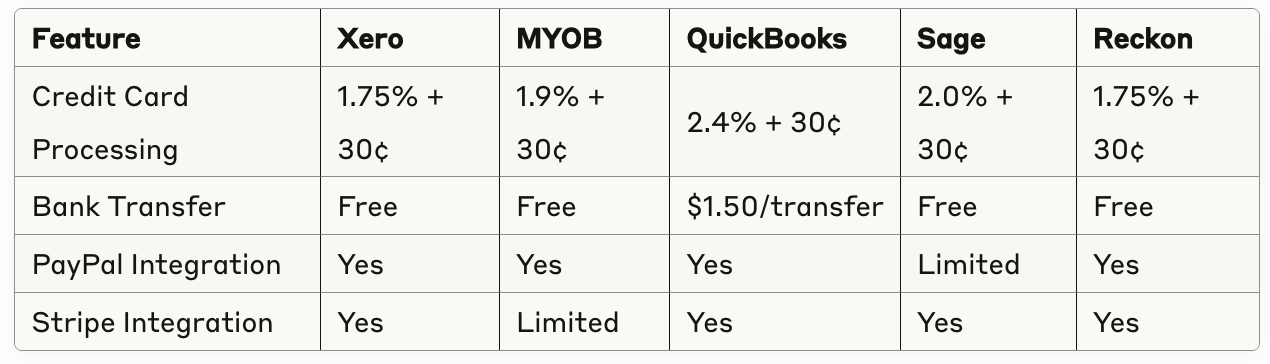
Essential Features Every Australian Business Needs
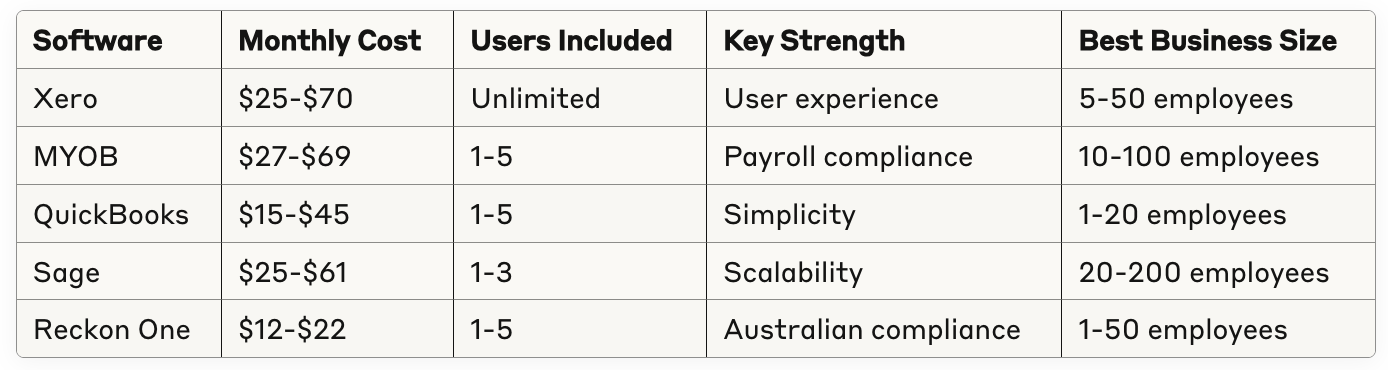
Top Accounting Software Solutions for Australian Businesses
Xero: The Market Leader
Pricing: Ignite $37, Grow $78 and Comprehensive $107 per month, AUD including GST, before any introductory discount (Xero pricing page, checked 14 November 2026)
Best For: Growing businesses seeking comprehensive features
Pricing: Solo $99 a year, Business Lite $315 a year, Business Pro $70 a month and AccountRight Plus $165 a month, before any introductory discount (MYOB pricing page, checked 14 November 2026)
Best For: Established businesses with complex payroll needs
Strengths:
Comprehensive payroll and HR features
Strong Australian compliance focus
Excellent customer support and training
Integrated payment processing
Industry-specific solutions
Key Features:
Advanced payroll with leave management
Purchase order and approval workflows
Multi-location inventory tracking
Detailed job costing capabilities
Professional services time billing
QuickBooks Online: The Global Player
Pricing: plans and prices change often, so check the vendor's current Australian pricing page before you compare
Best For: Small businesses prioritising simplicity and cost
Strengths:
User-friendly interface for beginners
Competitive pricing structure
Strong mobile app functionality
Integration with popular business tools
Automated expense categorisation
Key Features:
Receipt capture with mobile scanning
Automated mileage tracking
Class and location tracking
Basic inventory management
Standard financial reporting
Sage Business Cloud: The Enterprise Alternative
Pricing: plans and prices change often, so check the vendor's current Australian pricing page before you compare
Best For: Businesses planning significant growth
Strengths:
Scalable architecture for growing businesses
Advanced reporting and analytics
Multi-company management
Strong security and compliance features
Global capabilities for international businesses
Reckon One: The Value Leader
Pricing: plans and prices change often, so check the vendor's current Australian pricing page before you compare
Best For: Small businesses seeking cost-effective, feature-rich Australian accounting software
Strengths:
Competitive pricing with unlimited users
Strong Australian compliance features
Real-time cash flow reporting
Free onboarding session included
Comprehensive payroll capabilities
Key Features:
Unlimited invoices and transactions
GST tracking and BAS management
Automated bank feeds and reconciliation
Expense tracking with receipt capture
Single Touch Payroll compliance
Detailed Feature Comparison
Banking and Cash Flow Management
Xero:
Bank feeds from 200+ Australian financial institutions
Multi-currency support with real-time exchange rates
Cash flow forecasting with scenario planning
Automated bank reconciliation with learning algorithms
67% of small business owners use mobile apps daily
Invoice creation is the most common mobile task (43%)
Receipt capture saves average 3.5 hours weekly
Mobile payments increase collection speed by 28%
Implementation and Migration Strategies
Phase 1: Planning and Preparation (Weeks 1-2)
Audit existing accounting processes and data
Define requirements and success criteria
Choose software and plan configuration
Schedule training and support resources
Phase 2: Data Migration (Weeks 3-4)
Export data from existing system
Clean and organise historical data
Import and verify data accuracy
Set up chart of accounts and preferences
Phase 3: Testing and Training (Weeks 5-6)
Test all critical functions and integrations
Train staff on new processes and features
Develop documentation and procedures
Conduct parallel processing for validation
Phase 4: Go-Live and Optimisation (Weeks 7-8)
Switch to new system for live operations
Monitor performance and resolve issues
Optimise workflows and automation
Gather feedback and make adjustments
Migration Success Story:
A Perth-based retail business successfully migrated from desktop software to Xero in 6 weeks. The structured approach prevented data loss and minimised business disruption, while staff productivity improved by 25% within three months.
Cost Analysis: Total Cost of Ownership
Software Subscription Costs (Annual):
Sole trader entry plans: MYOB Solo $99 a year or MYOB Business Lite $315 a year
Xero Ignite: $444 a year ($37 a month)
Mid-tier plans: MYOB Business Pro $840 a year ($70 a month) or Xero Grow $936 a year ($78 a month)
Prices are list prices from the Xero and MYOB pricing pages, checked 14 November 2026, before introductory discounts. Xero states its prices include GST.
Additional Costs to Consider:
Implementation and setup: $500-$2,500
Data migration services: $300-$1,500
Staff training: $200-$1,000
Third-party integrations: $10-$100 monthly each
Payment processing fees: 1.5-2.5% of transactions
Return on Investment Calculation:
Example: 15-employee professional services firm
Costs:
Software: $600 annually
Implementation: $1,200 one-time
Training: $500 one-time
Total first-year cost: $2,300
Benefits:
Time savings: 12 hours weekly × $45/hour = $28,080 annually
Error reduction: $3,600 annually
Faster invoicing and collections: $8,400 annually
Total benefits: $40,080 annually
ROI: 1,644% first year, 6,580% ongoing
Security and Compliance Considerations
Data Security Features:
Bank-level encryption (256-bit SSL)
Two-factor authentication
Regular security audits and certifications
Australian data centre hosting
Automated backup and disaster recovery
Compliance Standards:
ISO 27001 security certification
SOC 2 Type II compliance
GDPR privacy compliance
Australian Privacy Principles adherence
ATO-approved reporting formats
Common Implementation Pitfalls and Solutions
Pitfall 1: Inadequate Planning
Problem: Rushing implementation without proper planning
Solution: Allocate 6-8 weeks for structured implementation
Impact: Prevents data loss and operational disruption
Pitfall 2: Insufficient Training
Problem: Staff struggling with new software features
Solution: Invest in comprehensive training and ongoing support
Impact: Maximises software ROI and user adoption
Pitfall 3: Poor Data Migration
Problem: Inaccurate or incomplete historical data transfer
Solution: Professional data migration services and verification
Impact: Ensures continuity and accurate reporting
Pitfall 4: Over-Customisation
Problem: Complex customisations that become difficult to maintain
Solution: Use standard features and proven best practices
Impact: Reduces ongoing maintenance and upgrade complexity
Future Trends in Accounting Software
Artificial Intelligence Integration:
Automated transaction categorisation
Predictive cash flow forecasting
Intelligent expense policy compliance
Fraud detection and prevention
Real-Time Financial Management:
Live financial dashboards
Instant notification systems
Real-time collaboration features
Continuous compliance monitoring
Advanced Analytics and Insights:
Machine learning-powered insights
Industry benchmarking capabilities
Predictive business intelligence
Automated management reporting
Making Your Final Decision
Evaluation Criteria Scorecard:
Rate each software option (1-5 scale):
Ease of use and interface quality
Feature completeness for your needs
Australian compliance capabilities
Integration with existing tools
Customer support quality
Total cost of ownership
Scalability for business growth
Security and reliability
Questions for Software Vendors:
What's included in your implementation and support package?
How do you handle data migration from our current system?
What training resources are available for our team?
How often do you update the software and add new features?
What's your uptime guarantee and disaster recovery process?
Trial Period Strategy:
Test with real business data during trial
Involve all key users in evaluation process
Test critical workflows and integrations
Evaluate customer support responsiveness
Compare actual vs claimed feature performance
The right accounting software becomes the financial backbone of your business, enabling better decisions, improved efficiency, and sustainable growth. Take time to evaluate options thoroughly, considering both current needs and future growth plans. The investment in proper selection and implementation pays dividends through improved financial management and business success.
Frequently Asked Questions (FAQ) - Small Business Accounting Software Australia
What are the key benefits of using cloud-based accounting software? Cloud-based software offers real-time data access from anywhere, automated bank feeds, integrated payment processing, mobile app access, and collaboration tools for teams and advisors.
Which essential features should Australian small businesses look for in accounting software? Key features include double-entry bookkeeping, bank reconciliation, GST and BAS reporting, PAYG and superannuation compliance, invoice automation, expense tracking, inventory management, and time/project tracking.
What are the top accounting software solutions available for Australian small businesses? Popular options include Xero, MYOB, QuickBooks Online, Sage Business Cloud, and Reckon One, each catering to different business needs and sizes.
How do pricing and plans generally compare across major accounting software providers? List prices for a sole trader start at $99 a year (MYOB Solo) and $37 a month (Xero Ignite), and mid-tier plans run about $70 to $107 a month (Xero and MYOB pricing pages, checked 14 November 2026), with entry-level plans suited for simple needs and advanced plans offering more features and integrations.
What Australian-specific compliance features do these accounting software packages support? They support GST calculation and BAS reporting, Single Touch Payroll (STP), PAYG withholding, superannuation compliance, and integration with the Australian Business Number (ABN) system.
How important is mobile app functionality in accounting software? Mobile apps enable invoice creation, receipt capture, bank monitoring, and payment acceptance on the go, improving efficiency and speeding up collections.
What are common challenges during accounting software implementation? Challenges include inadequate planning, insufficient staff training, poor data migration, and over-customisation of software features.
How long does a typical accounting software implementation take? A structured implementation process generally takes 6 to 8 weeks, including planning, data migration, training, testing, and go-live optimisation.
What security and compliance standards should small businesses expect from accounting software? Look for bank-level encryption, two-factor authentication, Australian data hosting, ISO 27001 certification, SOC 2 Type II compliance, and adherence to Australian Privacy Principles.
How can businesses evaluate and choose the right accounting software? Evaluate ease of use, feature completeness, Australian compliance, integration capabilities, customer support, cost of ownership, scalability, and security. Testing software during a trial period with real business data is recommended.
About Scale Suite
Scale Suite is a Sydney-based provider of outsourced finance teams and fractional CFO services for Australian SMEs. We deliver weekly bookkeeping, payroll, BAS/IAS lodgement, cashflow reporting, management accounts, and strategic fractional CFO oversight - all as a fully embedded team that works inside your business.
CA-qualified, Xero Certified, and registered BAS Agents, we replace fragmented bookkeepers and once-a-year accountants with one responsive finance function at a fraction of the cost of full-time hires. We serve growing businesses across Sydney, Melbourne, Brisbane, Adelaide, and Perth, with packages starting from $1,500 per month and no lock-in contracts.
Scale Suite is a Sydney-based provider of outsourced finance and HR services for Australian SMEs. We deliver bookkeeping, financial reporting, payroll processing, fractional CFO support, recruitment, employee onboarding, people and culture support, and fractional HR oversight, all as a fully embedded team that works inside your business.
Employment Hero Gold Partner, CA-qualified, and Xero Certified, we replace fragmented finance and HR processes with one responsive, senior-level function at a fraction of the cost of full-time hires. We serve growing businesses across Sydney, Melbourne, Brisbane, Adelaide, and Perth, with finance packages starting from $1,500 per month and no lock-in contracts.
We will review your current finance setup, compare the full cost of an internal hire against our embedded team, and show you exactly what your finance function should cost at your stage of growth. You will leave with a clear view of what is working, what is missing and where you would save. No lock-in contracts. 30-day money-back guarantee. Prefer to book directly? Grab a time here.
Thanks, you're in. Grab a time below.
Pick a 30-min slot that works and we'll see you there.
Prefer us to call you? We'll reach out with the details you've provided.
Oops! Something went wrong while submitting the form.