Published: April 2026
You have lodged your BAS. You know what you owe. Now you need to actually pay, and you cannot find the reference number. This is one of the most common frustrations Australian business owners face, and getting it wrong can mean your payment sits in ATO limbo for weeks, unallocated to your account, while you receive reminder notices for a debt you have already paid.
This guide shows you exactly where to find your Payment Reference Number (PRN), how to use it across different payment methods, and what to do if something goes wrong.
Your Payment Reference Number (PRN) is a unique number the ATO assigns to your account. It ensures your payment is credited to the correct obligation (BAS, PAYG instalment, income tax, etc.) without delay.
Critical point: you have different PRNs for different types of tax. Your PRN for activity statements (BAS/IAS) is different from your PRN for income tax, which is different from your PRN for FBT. If you use the wrong PRN, your payment will be applied to the wrong account. You might show as having overpaid your income tax while your BAS remains outstanding, triggering unnecessary debt collection activity.
The PRN may also be referred to as an "EFT code" (electronic funds transfer code) in some ATO communications. They are the same thing.
This is the quickest and most reliable method.
Step 1: Log in to the ATO Business Portal using your myGovID. Go to business.gov.au and select "ATO online services." You will need a myGovID (not a myGov account, which is for individuals) linked to your ABN through Relationship Authorisation Manager (RAM).
Step 2: Once logged in, navigate to Activity Statements in the menu.
Step 3: Select the relevant BAS period (e.g. January to March 2026).
Step 4: Look for the Payment section or Payment options link. Your PRN for activity statements will be displayed here, along with the amount owing and the due date.
Step 5: You can also navigate to Accounts and payments > Payment options for a summary of all PRNs across different tax types.
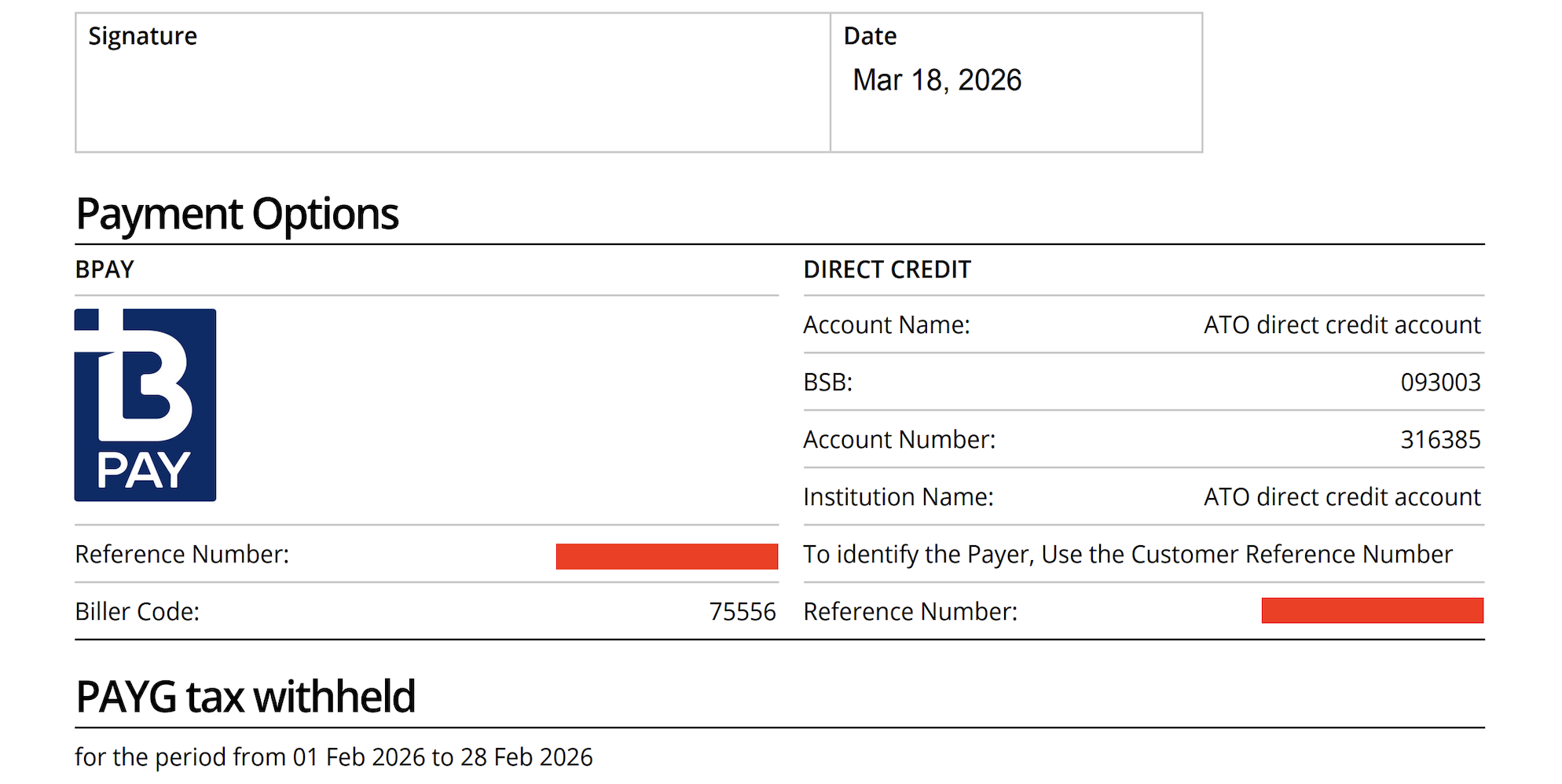
Tip: While you are there, select "Print-friendly version" to save or print a payment slip that includes your PRN, the BPAY biller code, and the EFT bank details. This is useful to keep on file for future payments.
If the ATO sent you a BAS notice (either by post or electronically through your online services), the PRN is printed on the payment slip attached to the notice. Look at the bottom section of the notice, which includes a tear-off or printable payment slip with the PRN, BPAY details, and EFT bank details.
If your BAS agent lodged on your behalf, the ATO may not send you a separate notice. In that case, use Method 1 or ask your BAS agent for the PRN (they can access it through Online Services for Agents).
If you cannot access the online portal and do not have a paper notice, call the ATO Business Line on 13 28 66 (8am to 6pm Monday to Friday). Have your ABN ready. They can provide your PRN over the phone.
There are four main ways to pay your BAS once you have your PRN.
You can pay via direct bank transfer to the ATO's official account at the Reserve Bank of Australia. The BSB, account number, and account name are published on the ATO's payment page. Use your PRN as the reference and nothing else. Do not add your ABN, business name, or any other text in the reference field. Only the PRN.
Log in to your online banking, select BPAY, and use the ATO's biller code (published on the ATO website and on your BAS notice). Enter your PRN in the reference field. Select the amount and payment date.
You can pay by Visa, Mastercard, or American Express through the ATO's Government EasyPay service online or by phoning 1300 898 089. A card payment fee applies (a percentage of the payment amount, varying by card type). From 1 January 2025, the ATO no longer passes on surcharges for debit card payments.
You can set up a direct debit to have BAS payments automatically deducted from your bank account or card. Set this up through ATO Online Services for Business or by calling 13 11 42. Allow at least 7 working days for a direct debit to be activated. Your BAS agent can also set up direct debit through Online Services for Agents.
Using the wrong PRN. Each tax type (activity statements, income tax, PAYG instalments, FBT) has a separate PRN. If you use your income tax PRN when paying your BAS, the payment goes to your income tax account. Your BAS obligation remains outstanding. Always double-check you are using the activity statement PRN.
Adding extra information in the reference field. The ATO's payment system reads the reference field to allocate your payment. If you type "BAS Q3 2026 ABC Pty Ltd 12345678" instead of just the PRN, the system may not be able to match it. Only put the PRN in the reference field. Nothing else.
Using your ABN instead of the PRN. Your ABN and your PRN are different numbers. Your ABN identifies your business. Your PRN identifies which specific ATO account the payment should go to. Using the ABN as a payment reference will not work.
Paying to the wrong bank account. The ATO's bank details (BSB 093-003, account 316385) do not change. Some businesses accidentally pay to a different government account or an old bank detail. Always verify the BSB and account number before making a payment.
Not allowing enough processing time. EFT and BPAY payments can take up to 4 business days to appear on your ATO account. If you pay on the due date, it may not be received by the ATO until 4 days later, which could result in late payment interest. Pay at least 4 business days before the due date.
If your payment was sent to the correct ATO bank account (BSB 093-003, account 316385) but with an incorrect or missing PRN, the payment will still reach the ATO but may not be allocated to the correct account. This can result in the ATO treating your BAS as unpaid and potentially issuing reminder notices or applying General Interest Charge (GIC).
What to do: Contact the ATO on 13 28 66 with the following information: your ABN, the date the payment was made, the amount, the bank account you paid from, the reference number you used (even if incorrect), and any receipt or transaction ID from your bank.
The ATO can manually reallocate the payment to the correct account. This process can take several weeks, so it is far better to get the PRN right in the first place.
This occasionally happens, particularly when BAS has been lodged through third-party software or when amendments have been processed. If you see different PRNs on a paper notice versus the online portal, use the PRN from Online Services for Business (the portal). The portal reflects the most current information.
If you are unsure, call the ATO to confirm before making the payment.
If you prefer not to manually pay each quarter (or more frequently under IAS obligations), you can set up recurring payments.
Direct debit: Set up through ATO Online Services for Business. The ATO will automatically deduct the amount owing on the due date. This eliminates the risk of late payment but requires you to have sufficient funds in the nominated account.
Scheduled BPAY: Most Australian banks allow you to schedule future BPAY payments. Set a recurring BPAY payment to biller code 75556 with your activity statement PRN on the 25th of each month following the end of each quarter (or adjust to match your specific due dates).
Payment plans: If you cannot pay the full amount by the due date, contact the ATO before the due date to set up a payment plan. Payment plans allow you to pay in instalments over time. GIC still applies to the outstanding balance, but you avoid more punitive enforcement action. You can set up a payment plan through the online portal for debts up to $200,000.
For the full schedule of quarterly and monthly due dates, see our BAS due dates article.
If your BAS payment is late, the ATO may apply General Interest Charge (GIC). The current GIC rate is 10.96 per cent per annum (for the quarter beginning 1 January 2026). GIC compounds daily on the outstanding amount.
In addition to GIC, persistent late payments can result in the ATO issuing a Failure to Lodge (FTL) penalty if the BAS itself is not lodged on time ($330 per 28-day period, up to a maximum of five periods), placing your account with an external debt collection agency, or issuing a Director Penalty Notice for unpaid GST, PAYG withholding, or superannuation.
If you know you will be late, contact the ATO proactively. They are generally more accommodating when you reach out before the due date rather than after.
Where do I find my BAS payment reference number?
Log in to ATO Online Services for Business via myGovID. Navigate to Activity Statements, select the relevant period, and look for the Payment section. Your PRN is displayed there. Alternatively, it is printed on your BAS notice or assessment.
Is my PRN the same as my ABN?
No. Your ABN identifies your business. Your PRN identifies which specific tax account at the ATO your payment should be credited to. They are different numbers.
Do I have one PRN or multiple?
Multiple. You have separate PRNs for activity statements (BAS/IAS), income tax, PAYG instalments, FBT, and other obligations. Always use the correct PRN for the type of payment you are making.
What happens if I forget to include the PRN?
Your payment may still reach the ATO (if the BSB and account number are correct) but it will not be allocated to your account automatically. This can result in your BAS showing as unpaid. Contact the ATO with your payment details to have it manually allocated.
Can my BAS agent find my PRN for me?
Yes. Registered BAS agents can access your PRN through Online Services for Agents. If your BAS agent lodges your BAS, ask them to provide the PRN and payment details at the same time.
How long does it take for the ATO to process my payment?
Up to 4 business days for EFT and BPAY payments. Card payments through Government EasyPay are generally faster.
Can I pay my BAS by credit card?
Yes, through the ATO's Government EasyPay service (online or phone 1300 898 089). Visa, Mastercard, and American Express are accepted. A card payment fee applies, expressed as a percentage of the payment amount.
What is the BPAY biller code for the ATO?
75556 for all ATO payments. You still need to use the correct PRN in the reference field to ensure the payment goes to the right account.
If you pay BAS quarterly, save your activity statement PRN somewhere accessible right now: in your password manager, pinned in your accounting notes, or in a recurring calendar reminder with the PRN included. Having it on hand when the quarterly due date arrives eliminates the scramble and reduces the risk of paying with the wrong reference.
Scale Suite is a Sydney-based provider of outsourced finance teams and fractional CFO services for Australian SMEs. We deliver weekly bookkeeping, payroll, BAS/IAS lodgement, cashflow reporting, management accounts, and strategic fractional CFO oversight as a fully embedded team that works inside your business.
CA-qualified, Xero Certified, and registered BAS Agents, we replace fragmented bookkeepers and once-a-year accountants with one responsive finance function at a fraction of the cost of full-time hires. We serve growing businesses across Sydney, Melbourne, Brisbane, and Perth, with packages starting from $1,500 per month and no lock-in contracts.
See registered BAS agent services for SMEs
Disclaimer: This article provides general information only and does not constitute financial, legal, or professional advice. Scale Suite Pty Ltd (ABN 16 684 424 771) recommends seeking advice tailored to your specific circumstances. Liability limited by a scheme approved under professional standards legislation.
Sources
Scale Suite is a Sydney-based provider of outsourced finance and HR services for Australian SMEs. We deliver bookkeeping, financial reporting, payroll processing, fractional CFO support, recruitment, employee onboarding, people and culture support, and fractional HR oversight, all as a fully embedded team that works inside your business.
Employment Hero Gold Partner, CA-qualified, and Xero Certified, we replace fragmented finance and HR processes with one responsive, senior-level function at a fraction of the cost of full-time hires. We serve growing businesses across Sydney, Melbourne, Brisbane, and Perth, with packages starting from $1,500 per month and no lock-in contracts.
30 minutes with our team.
We will review your current finance setup, compare the full cost of an internal hire against our embedded team, and show you exactly what your finance function should cost at your stage of growth.
You will leave with a clear view of what is working, what is missing and where you would save.
No lock-in contracts. 30-day money-back guarantee.
Prefer to book directly? Grab a time here.